
Lab 4: Agents#
In this notebook, we leverage an LLM’s reasoning capabilities to plan and execute actions in order to solve a task. We will use LangChain tools to allow LLMs to interface with external sources. Tools are functions or APIs which help provide the LLM with relevant context. We will be examining some popular built-in tool integrations in this notebook. Agents harness the reasoning capabilities of LLMs to plan actions to solve the task. LangChain agents have the capability to not only plan, but also execute the actions decided upon. An agent can be given access to tools, which the agent may select to solve the task. In this notebook we will develop custom agents with access to certain tools, and observe how the agent selects the appropriate tool, retrieves the results using the selected tool, and produces the final response.
Table of contents#
You will be presented with two kinds of exercises throughout the notebook: activities and challenges.
About this Lab#
Throughout this lab, you will encounter two types of interactive elements:


No coding is needed for an activity. You try to understand a concept, answer questions, or run a code cell.
Challenges are where you test your understanding by implementing something new or taking a short quiz.
Please work through this notebook from top to bottom to avoid errors due to missing code or context.
1. Setup and configuration#
First, let’s install and import the necessary libraries, including the LangChain library.
%%capture
!pip3 install -r ../requirements.txt --quiet
import sys
sys.path.append('..')

import boto3
import json
from datetime import date, time

import warnings
from IPython.display import Markdown

warnings.filterwarnings("ignore")
1.2. Validate LLM model access#
As a first step we need to verify that the LLM models required in this lab are accessible. Lets do that now by using the helper function validate_models_access and provide the list of LLM models that we require for this lab. If the call to validate_models_access returns any model ids in the output list then you will need to go to the Amazon Bedrock console and enable access to the required models.
from mlu_utils.helpers import validate_models_access

if not validate_models_access(["amazon.nova-lite-v1:0", "mistral.mixtral-8x7b-instruct-v0:1", "amazon.nova-lite-v1:0"]):
    print("The models are accessible. You can go ahead running this notebook.")
The models are accessible. You can go ahead running this notebook.
2. Define the Amazon Bedrock model for inference#
Let’s select the Amazon Bedrock model the same way we did in the previous labs.
Tip: Please opt for frugal practices when using Amazon Bedrock such as using smaller LLMs for simpler tasks and only reserving the use of the larger LLMs for more complex use cases.
from langchain_aws import ChatBedrockConverse
from langchain_core.output_parsers import StrOutputParser


bedrock_llm = ChatBedrockConverse(
    model="amazon.nova-lite-v1:0",
    temperature=0,
    max_tokens=None,
)
3. Tools and toolkits#
In this section, we will explore various LangChain tools that allow LLMs to interface with external sources. Tools are functions or APIs which help provide the LLM with relevant context.
Tools are functions that agents can use to interact with the world. These tools can be generic utilities (e.g. search), other chains, or even other agents. With tools, LLMs can search the web, do math, run code, and more. While the LangChain library provides a substantial selection of pre-built tools, in many real-world projects, we’ll often find that existing tool might not work out-of-the-boxi as expected. Eventually we might need to modify existing tools or build entirely new ones.
# Load libraries for the upcoming cells
from langchain.agents import Tool
from langchain.tools import tool
3.1 Wikipedia tool#
Wikipedia is a multilingual free online encyclopedia written and maintained by a community of volunteers, through open collaboration. It is the largest and most-read reference work in history.
To use the Wikipedia tool, you need to first install the wikipedia package.
from langchain_community.utilities import WikipediaAPIWrapper
from langchain_core.tools import Tool
from IPython.display import Markdown

# Initialize the robust wrapper
api_wrapper = WikipediaAPIWrapper()

wikipedia_tool = Tool(
    name="WikipediaTool",
    func=api_wrapper.run,
    description="Useful to answer general questions about people, places, companies, facts, historical events, or other subjects."
)

# Run your test
Markdown(wikipedia_tool.invoke("What is the Archimedes Principle?"))
Page: Archimedes’ principle Summary: Archimedes’ principle states that the upward buoyant force that is exerted on a body immersed in a fluid, whether fully or partially, is equal to the weight of the fluid that the body displaces. Archimedes’ principle is a law of physics fundamental to fluid mechanics. It was formulated by Archimedes of Syracuse.
Page: Archimedes Summary: Archimedes of Syracuse ( AR-kih-MEE-deez; c. 287 – c. 212 BC) was an Ancient Greek mathematician, physicist, engineer, astronomer, and inventor from the city of Syracuse in Sicily. Although few details of his life are known, based on his surviving work, he is considered one of the leading scientists in classical antiquity, and one of the greatest mathematicians of all time. Archimedes anticipated modern calculus and analysis by applying the concept of the infinitesimals and the method of exhaustion to derive and rigorously prove many geometrical theorems, including the area of a circle, the surface area and volume of a sphere, the area of an ellipse, the area under a parabola, the volume of a segment of a paraboloid of revolution, the volume of a segment of a hyperboloid of revolution, and the area of a spiral. Archimedes’ other mathematical achievements include deriving an approximation of pi (π), defining and investigating the Archimedean spiral, and devising a system using exponentiation for expressing very large numbers. He was also one of the first to apply mathematics to physical phenomena, working on statics and hydrostatics. Archimedes’ achievements in this area include a proof of the law of the lever, the widespread use of the concept of center of gravity, and the enunciation of the law of buoyancy known as Archimedes’ principle. In astronomy, he made measurements of the apparent diameter of the Sun and the size of the universe. He is also said to have built a planetarium device that demonstrated the movements of the known celestial bodies, and may have been a precursor to the Antikythera mechanism. He is also credited with designing innovative machines, such as his screw pump, compound pulleys, and defensive war machines to protect his native Syracuse from invasion. Archimedes died during the siege of Syracuse, when he was killed by a Roman soldier despite orders that he should not be harmed. Cicero describes visiting Archimedes’ tomb, which was surmounted by a sphere and a cylinder that Archimedes requested be placed there to represent his most valued mathematical discovery. Unlike his inventions, Archimedes’ mathematical writings were little known in antiquity. Alexandrian mathematicians read and quoted him, but the first comprehensive compilation was not made until c. 530 AD by Isidore of Miletus in Byzantine Constantinople, while Eutocius’ commentaries on Archimedes’ works in the same century opened them to wider readership for the first time. In the Middle Ages, Archimedes’ work was translated into Arabic in the 9th century and then into Latin in the 12th century, and were an influential source of ideas for scientists during the Renaissance and in the Scientific Revolution. The discovery in 1906 of works by Archimedes in the Archimedes Palimpsest has provided new insights into how he obtained mathematical results.
Page: Bernoulli’s principle Summary: Bernoulli’s principle is a key concept in fluid dynamics that relates pressure, speed and height. For example, for a fluid flowing horizontally, Bernoulli’s principle states that an increase in the speed occurs simultaneously with a decrease in pressure. The principle is named after the Swiss mathematician and physicist Daniel Bernoulli, who published it in his book Hydrodynamica in 1738. Although Bernoulli deduced that pressure decreases when the flow speed increases, it was Leonhard Euler in 1752 who derived Bernoulli’s equation in its usual form. Bernoulli’s principle can be derived from the principle of conservation of energy. This states that, in a steady flow, the sum of all forms of e
3.2 PubMed tool#
PubMed is a free search engine for medical papers and articles. Let’s create a PubMed tool capable of retrieving search results from PubMed.
from langchain.tools import PubmedQueryRun

# Define the API wrapper for PubMed search
pubmed_search = PubmedQueryRun()

# Define the PubMed tool using a description and the function to retrieve results from PubMed
pubmed_tool = Tool(
    name="PubmedQueryRun",
    func=pubmed_search.run,
    description="Useful for when you need medical information",
)

# Test PubMed tool
Markdown(pubmed_tool.invoke("Covid diagnosis"))
Too Many Requests, waiting for 0.20 seconds...
Too Many Requests, waiting for 0.40 seconds...
Too Many Requests, waiting for 0.80 seconds...
Published: 2026-06-11 Title: Cardiac Telerehabilitation Using a Smartwatch and a Gamified Smartphone App: Single-Arm Pre-Post Feasibility Study. Copyright Information: © Yusaku Arima, Toshiki Kaihara, Megumi Nakamura, Keita Sone, Toshiya Yoshida, Yui Utsugi, Shiori Takizawa, Shunichi Doi, Kei Honda, Yoshikuni Kobayashi, Akira Kasagawa, Yasuhito Kawagoe, Takahiko Kai, Masashi Koga, Takumi Higuma, Yasuhiro Tanabe, Yoshihiro Akashi. Originally published in JMIR Cardio (https://cardio.jmir.org). Summary:: BACKGROUND: Home-based cardiac rehabilitation (CR) using digital health technologies (ie, cardiac telerehabilitation [CTR]) has emerged as a practical alternative to conventional center-based CR, particularly during and after the COVID-19 pandemic. However, maintaining sustained participation in CR remains challenging. Gamification holds the potential to enhance motivation and adherence in CR, but its role in CTR for patients with acute coronary syndrome (ACS) remains under-studied. OBJECTIVE: This feasibility study evaluated the feasibility, acceptability, and safety of a combination of a gamification-enabled smartphone app and a smartwatch supporting CTR after ACS. We focused specifically on participation motivation, adherence to prescribed exercise intensity, and short-term physiological outcomes. METHODS: This single-arm, pre-post intervention study was conducted at 2 Japanese institutions. Sixteen patients diagnosed with ST-elevated myocardial infarction or non-ST-elevated myocardial infarction and undergoing percutaneous coronary intervention were enrolled after discharge. Each patient received a smartphone and smartwatch connected to the Shin-po Kei app, through which participants earned points when exercising within their target anaerobic threshold heart rate (HR) range (±10 bpm). The 1-month intervention prescribed walking for 30 minutes or longer 3 to 5 days or more per week, at an intensity corresponding to a Borg scale score of 11 to 13. The primary end poi
3.4 File system tool#
The file system tools allow an LLM to interact with the local file system. You can also choose to load all the file system tools by simply loading the FileManagementToolkit.
Important: Take caution when using this tool in production environments. The results may be inconsistent or incorrect.
from langchain.agents.agent_toolkits import FileManagementToolkit
from langchain.tools.file_management import (
    ReadFileTool,
    CopyFileTool,
    DeleteFileTool,
    MoveFileTool,
    WriteFileTool,
    ListDirectoryTool,
)

# File management toolkit
file_management_toolkit = FileManagementToolkit(
    selected_tools=["read_file", "list_directory"],
)

# Define the module for list directory tool
list_dir = ListDirectoryTool()

# Define the list directory tool as a structured tool
@tool
def list_dir_tool(directory_path: str) -> str:
    """List the contents of a directory. Input is the path to the directory."""
    return list_dir.run(directory_path.strip().strip('"').strip("'"))

# Test list directory tool
print(list_dir_tool.invoke("./"))
data
lab4_agents.ipynb
.ipynb_checkpoints
3.5 Custom tool#
You can define custom tools using the tool decorator.
DuckDuckGo is an internet privacy company most popularly known for their private search engine. The company emphasizes privacy and anonymity as one of the key principles behind all their products.
Let’s create a DuckDuckGo tool that is capable of retrieving results from a web search.
#from duckduckgo_search import DDGS
from ddgs import DDGS
from langchain.document_loaders import UnstructuredURLLoader

@tool
def web_search(text: str) -> str:
    """Retrieve information about current events from a web search using an input query."""

    results = "".join([result['body'] for result in list(DDGS().text(text, backend='lite', region='us-en', safesearch='on', max_results=5))])

    return results
# Define the web search tool
web_search_tool = Tool(
    name="WebSearchTool", func=web_search, description="Useful to retrieve current events from a web search."
)

Markdown(web_search_tool.run("Name of the 6th president of US?"))
John Quincy Adams (/ ˈkwɪnzi / ⓘ; [a] July 11, 1767 - February 23, 1848) was the sixth president of the United States, serving from 1825 to 1829. He previously served as the eighth United States secretary of state from 1817 to 1825; minister to Great Britain, Prussia, and Russia; and senator for Massachusetts. After his presidency, Adams uniquely returned to Congress as a member of the …List of presidents of the United States The White House ‘s north and south sides, official residence of the president of the United States The president of the United States is the head of state and head of government of the United States, [1] indirectly elected to a four-year term via the Electoral College. [2] Under the U.S. Constitution, the officeholder leads the executive branch of the …Learn more about the Presidents of the United States from WhiteHouse.gov.The biography for President Adams and past presidents is courtesy of the White House Historical Association. John Quincy Adams, son of John and Abigail Adams, served as the sixth President of the United States from 1825 to 1829. A member of multiple political parties over the years, he also served as a diplomat, a Senator, and a member of the House of Representatives.What Happens if the President Dies? If the president of the United States dies, the vice president immediately assumes the office of president. The Twenty-fifth Amendment to the U.S. Constitution, ratified in 1967, clearly outlines the process of presidential succession, codifying what had been a traditional practice.
Code Example: Custom Date Tool#
Let's define another custom tool that returns the current date regardless of the input.
@tool
def curr_date(text: str) -> str:
    """Returns todays date, use this for any \
    questions related to knowing todays date. \
    The input should always be an empty string, \
    and this function will always return todays \
    date - any date math should occur \
    outside this function."""
    return str(date.today())
# Define the date tool
date_tool = Tool(
    name="DateTool", func=curr_date, description="Useful to retrieve the current date"
)

# Test date tool
print(date_tool.run("Test"))
2026-06-11
4. Agents#
An LLM can be perceived as more than a source of knowledge that can be queried. LLMs have also demonstrated strong reasoning capabilities. More and more, LLMs are being popularly used as reasoning engines to plan a series of actions to take, as well as to define their execution order. A LangChain agent uses an LLM to plan the actions and allow their execution. Agents can be given access to tools to solve a task. An agent creates a plan to use the appropriate tool based on the prompt, runs the tool to retrieve the results, and produces the final response.
An Agent is a wrapper around a model, which takes in user input and returns a response corresponding to an “action” to take and a corresponding “action input”. With agents, an LLM is used as a reasoning engine to determine which actions to take and in which order.
LangChain provides a utility to initialize an agent. To do so, we need to pass the following parameters:
tools: a list of tools that the model has access tollm: the language model that will perform the reasoning and act processagent: the type of agent that we want to initialize
Tip: LangChain agents are very specialized for models with extensive reasoning capabilities and may not work perfectly with other LLMs.
4.1 Python agent#
Let’s use the PythonREPLTool to define a Python agent capable of writing and implementing Python code. This is simply a demonstration. Expect errors while implementing the next cell. The intention of this is to demonstrate how an agent reasons to solve a task.
Warning! This demo does not use or teach security best practices. You should not allow Generative AI to run arbitrary code on production systems.
from langchain_experimental.tools import PythonREPLTool
from langchain.agents import AgentType
from langchain.agents import initialize_agent

# Define the tool
python_repl = PythonREPLTool()

# Define the agent with the PythonReplTool using tool-calling
python_agent = initialize_agent(
    [PythonREPLTool()],
    bedrock_llm,
    agent=AgentType.STRUCTURED_CHAT_ZERO_SHOT_REACT_DESCRIPTION,
    verbose=True,
    handle_parsing_errors=True,
)
Customizing the agent’s prompt template#
LangChain’s Zero-shot React Description agent orchestrates the sequence of thoughts-actions-observations via a default template that is stored in agent.agent.llm_chain.prompt.template as you can see below.
For more control on the ReAct results, it is possible to customize the LLM agent’s prompt template, as demonstrated in this Custom LLM agent walkthrough. This way, one can force the agent to output the final answer in a special format or style. Similarly, one can make rules to the LLM explicit in the prompt template, for instance adding an instruction for the LLM to always use a particular tool as the first tool or enforcing a specific order constraint when calling the available tools.
# Default prompt template of the agent
for msg in python_agent.agent.llm_chain.prompt.messages:
    print(type(msg).__name__, ':', msg.prompt.template if hasattr(msg, 'prompt') else msg)
    print()
SystemMessagePromptTemplate : Respond to the human as helpfully and accurately as possible. You have access to the following tools:

Python_REPL: A Python shell. Use this to execute python commands. Input should be a valid python command. If you want to see the output of a value, you should print it out with `print(...)`., args: {{'query': {{'title': 'Query', 'type': 'string'}}}}

Use a json blob to specify a tool by providing an action key (tool name) and an action_input key (tool input).

Valid "action" values: "Final Answer" or Python_REPL

Provide only ONE action per $JSON_BLOB, as shown:

```
{{
  "action": $TOOL_NAME,
  "action_input": $INPUT
}}
```

Follow this format:

Question: input question to answer
Thought: consider previous and subsequent steps
Action:
```
$JSON_BLOB
```
Observation: action result
... (repeat Thought/Action/Observation N times)
Thought: I know what to respond
Action:
```
{{
  "action": "Final Answer",
  "action_input": "Final response to human"
}}
```

Begin! Reminder to ALWAYS respond with a valid json blob of a single action. Use tools if necessary. Respond directly if appropriate. Format is Action:```$JSON_BLOB```then Observation:.
Thought:

HumanMessagePromptTemplate : {input}

{agent_scratchpad}
# Test the python Agent
python_agent.invoke(
    {
        "input": "Calculate the mean and standard deviation of the following numbers: 13, 8, 53, 77, 91, 27"
    }
)
> Entering new AgentExecutor chain...
Python REPL can execute arbitrary code. Use with caution.
Thought: To calculate the mean and standard deviation of the given numbers, I will use the Python_REPL tool. I will first calculate the mean and then the standard deviation using the appropriate Python functions.

Action:
```
{
  "action": "Python_REPL",
  "action_input": "import statistics\nnumbers = [13, 8, 53, 77, 91, 27]\nmean = statistics.mean(numbers)\nstd_dev = statistics.stdev(numbers)\nprint(mean, std_dev)"
}
```
Observation:
Observation: 44.833333333333336 34.411722808756124

Thought:Action:
```
{
  "action": "Final Answer",
  "action_input": "The mean of the numbers 13, 8, 53, 77, 91, 27 is 44.83 and the standard deviation is 34.41."
}
```

> Finished chain.
{'input': 'Calculate the mean and standard deviation of the following numbers: 13, 8, 53, 77, 91, 27',
 'output': 'The mean of the numbers 13, 8, 53, 77, 91, 27 is 44.83 and the standard deviation is 34.41.'}
4.2 Q&A with structured data#
Let’s create a pandas dataframe agent, capable of writing Python code to query and extract data from the dataframe. This is simply a demonstration. Expect errors while implementing the next cell. The intention of this is to demonstrate how an agent reasons to solve a task.
For this example, we will be using the Electric Vehicle Population Data dataset that shows the Battery Electric Vehicles (BEVs) and Plug-in Hybrid Electric Vehicles (PHEVs) that are currently registered through Washington State Department of Licensing (DOL).
from langchain_experimental.agents import create_pandas_dataframe_agent, create_csv_agent
import pandas as pd

df = pd.read_csv('data/Electric_Vehicle_Population_Data.csv')
df.head()
| VIN (1-10) | County | City | State | Postal Code | Model Year | Make | Model | Electric Vehicle Type | Clean Alternative Fuel Vehicle (CAFV) Eligibility | Electric Range | Base MSRP | Legislative District | DOL Vehicle ID | Vehicle Location | Electric Utility | 2020 Census Tract | |
|---|---|---|---|---|---|---|---|---|---|---|---|---|---|---|---|---|---|
| 0 | 5YJ3E1EBXK | King | Seattle | WA | 98178.0 | 2019 | TESLA | MODEL 3 | Battery Electric Vehicle (BEV) | Clean Alternative Fuel Vehicle Eligible | 220.0 | 0.0 | 37.0 | 477309682 | POINT (-122.23825 47.49461) | CITY OF SEATTLE - (WA)|CITY OF TACOMA - (WA) | 5.303301e+10 |
| 1 | 5YJYGDEE3L | Kitsap | Poulsbo | WA | 98370.0 | 2020 | TESLA | MODEL Y | Battery Electric Vehicle (BEV) | Clean Alternative Fuel Vehicle Eligible | 291.0 | 0.0 | 23.0 | 109705683 | POINT (-122.64681 47.73689) | PUGET SOUND ENERGY INC | 5.303509e+10 |
| 2 | KM8KRDAF5P | Kitsap | Olalla | WA | 98359.0 | 2023 | HYUNDAI | IONIQ 5 | Battery Electric Vehicle (BEV) | Eligibility unknown as battery range has not b... | 0.0 | 0.0 | 26.0 | 230390492 | POINT (-122.54729 47.42602) | PUGET SOUND ENERGY INC | 5.303509e+10 |
| 3 | 5UXTA6C0XM | Kitsap | Seabeck | WA | 98380.0 | 2021 | BMW | X5 | Plug-in Hybrid Electric Vehicle (PHEV) | Clean Alternative Fuel Vehicle Eligible | 30.0 | 0.0 | 35.0 | 267929112 | POINT (-122.81585 47.64509) | PUGET SOUND ENERGY INC | 5.303509e+10 |
| 4 | JTMAB3FV7P | Thurston | Rainier | WA | 98576.0 | 2023 | TOYOTA | RAV4 PRIME | Plug-in Hybrid Electric Vehicle (PHEV) | Clean Alternative Fuel Vehicle Eligible | 42.0 | 0.0 | 2.0 | 236505139 | POINT (-122.68993 46.88897) | PUGET SOUND ENERGY INC | 5.306701e+10 |
agent = create_pandas_dataframe_agent(
    bedrock_llm,
    df,
    verbose=True,
    agent_type="tool-calling",
    handle_parsing_errors=True,
    allow_dangerous_code=True,
)

# The CSV agent is quite fickle. We will append helpful instructions to the prompt to make the agent more robust.
prompt = """{} The results from the tool execution might be the extracted rows. Analyze the output of the tool first before proceeding."""
response = agent.invoke({"input": prompt.format("What are the top 5 models sold? Give me the number of units sold as well.")})
> Entering new AgentExecutor chain...

Invoking: `python_repl_ast` with `{'query': "df.groupby('Model')['VIN (1-10)'].count().sort_values(ascending=False).head(5)"}`
responded: [{'type': 'text', 'text': "<thinking> To find the top 5 models sold, I need to group the data by the 'Model' column and then count the number of units sold for each model. I will use the pandas library to perform this operation. </thinking>\n", 'index': 0}, {'type': 'tool_use', 'name': 'python_repl_ast', 'id': 'tooluse_HOqwzoIfk1gR2idII7DMnt', 'index': 1, 'input': '{"query":"df.groupby(\'Model\')[\'VIN (1-10)\'].count().sort_values(ascending=False).head(5)"}'}]

Model
MODEL Y    49253
MODEL 3    36065
LEAF       13814
MODEL S     7885
BOLT EV     7278
Name: VIN (1-10), dtype: int64[{'type': 'text', 'text': '<thinking> The tool has provided the top 5 models sold along with the number of units sold for each model. I will now present this information to the User. </thinking>\n\nThe top 5 models sold are:\n\n1. MODEL Y with 49,253 units sold\n2. MODEL 3 with 36,065 units sold\n3. LEAF with 13,814 units sold\n4. MODEL S with 7,885 units sold\n5. BOLT EV with 7,278 units sold', 'index': 0}]

> Finished chain.
# Print the final response
output = response['output']
# Handle Nova models returning a list of content blocks instead of a plain string
if isinstance(output, list):
    output = '\n'.join(block.get('text', '') for block in output if isinstance(block, dict))
Markdown(output)
The top 5 models sold are:
MODEL Y with 49,253 units sold
MODEL 3 with 36,065 units sold
LEAF with 13,814 units sold
MODEL S with 7,885 units sold
BOLT EV with 7,278 units sold
4.3 Agent with automatic tool selection#
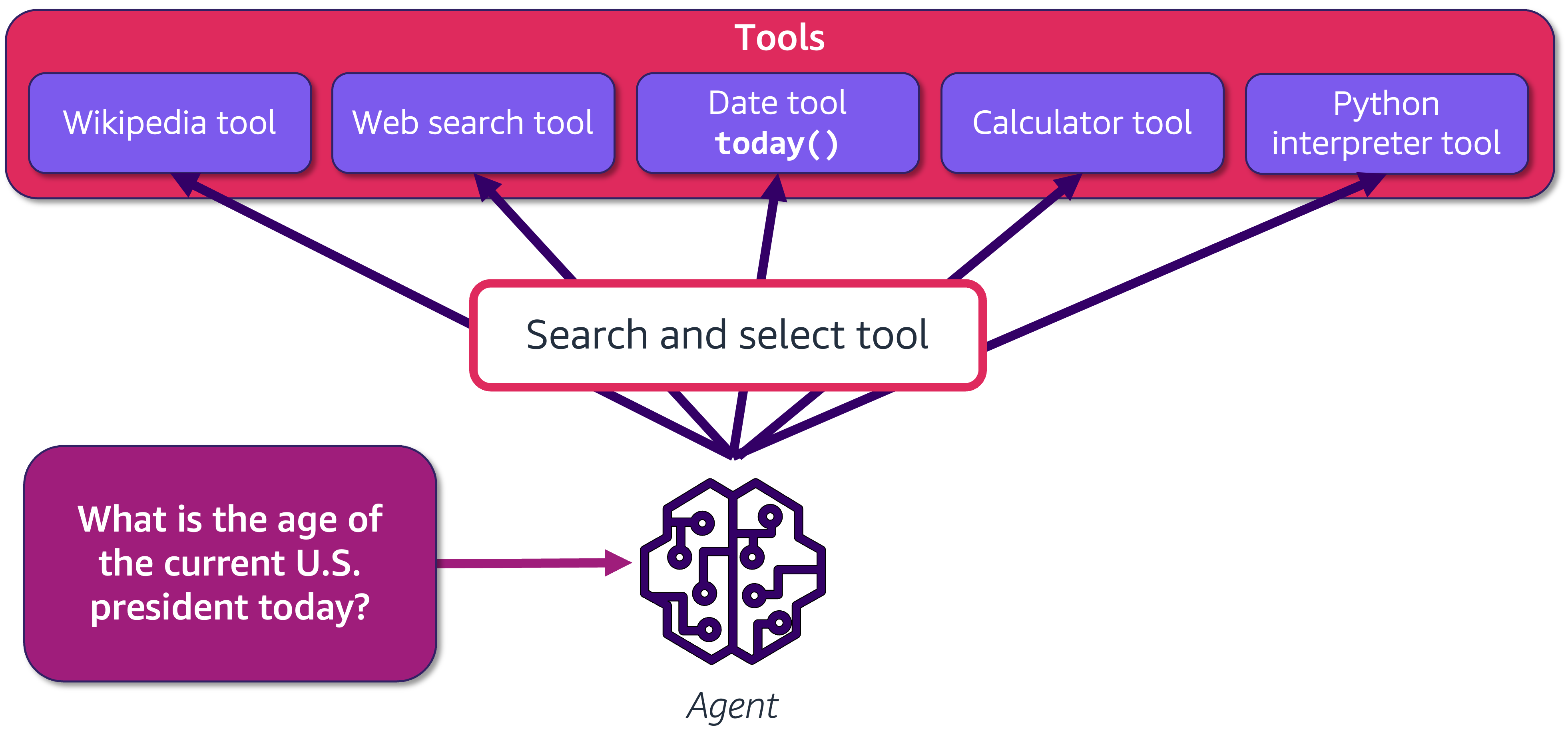
The last example shows how an agent uses the PythonREPL tool to write Python code and execute it to obtain the desired results. In the next demonstration, let’s use an agent which has access to more than one tool and is required to perform the following tasks:
Reason and select the relevant tool based on the prompt
Create the query for the selected tool to get the desired results
Analyze the results and generate the correct answer in response to the prompt
from langchain.agents import load_tools
from langchain.agents import initialize_agent

# Define a list of available tools for the agent
tools = [
    wikipedia_tool,
    web_search_tool,
    pubmed_tool,
    date_tool,
    python_repl,
    list_dir_tool,
]

agent = initialize_agent(
    agent=AgentType.STRUCTURED_CHAT_ZERO_SHOT_REACT_DESCRIPTION,
    tools=tools,
    llm=bedrock_llm,
    verbose=True,
    handle_parsing_errors=True,
)

Activity: Try different prompts#
    Try different prompts and observe the responses generated by the agent.
    Note: Results may not be factually accurate and may be based on false assumptions.
Automatically select and use the DuckDuckGo tool#
Let’s examine whether the agent is able to reason and select the DuckDuckGo tool and the DateTool tool to respond about the weather conditions in New York.
agent.invoke({"input": "Should I carry an umbrella in New York City tomorrow?"})
> Entering new AgentExecutor chain...
Thought: To answer this question, I need to check the weather forecast for New York City for tomorrow. I will use the WebSearchTool to get the current weather forecast.

Action:
```
{
  "action": "WebSearchTool",
  "action_input": "New York City weather forecast for tomorrow"
}
```
Observation:
Observation: New York City, NY Weather Forecast, with current conditions, wind, air quality, and what to expect for the next 3 days.Daily Forecast New York City, New York · as of 5:00 PM PDT · Tonight. 2%. Clear. 59°. 74°. 6 mph -- WSW · Tue 09. 0%. Mostly Sunny. 66°. 80°. 10 mph -- SSW · Wed ..."City, St" or ZIP code. Sorry, the location you searched for was not ... Weather Forecast Office. NWS Forecast Office New York, NY. Weather.gov > New ...That change becomes more apparent on Saturday, which is shaping up to be one of the more pleasant days in the forecast. While temperatures will still be ...14-day forecast. Add to your locationsAdd to your locations. Weather warnings issued. Forecast - New York. Day by day forecast. Last updated today at 16:00.
Thought:Action:
```
{
  "action": "WebSearchTool",
  "action_input": "New York City weather forecast for tomorrow"
}
```
Observation:
Observation: 1 day ago - New York, NY Weather Forecast, with current conditions, wind, air quality, and what to expect for the next 3 days.3 weeks ago - Be prepared with the most accurate 10-day forecast for New York City, New York with highs, lows, chance of precipitation from The Weather Channel and Weather.com5 days ago - Storm Team 4 brings you the latest weather forecast and live radar. NBC New York meteorologists cover the five boroughs and New Jersey.3 weeks ago - A chance of showers and thunderstorms before 11pm, then showers likely and possibly a thunderstorm between 11pm and 2am. Mostly cloudy, with a low around 75. West wind 8 to 10 mph. Chance of precipitation is 60%. New rainfall amounts of less than a tenth of an inch, except higher amounts possible ...1 day ago - Click a location below for detailed forecast.
Thought:Action:
```
{
  "action": "WebSearchTool",
  "action_input": "New York City weather forecast for tomorrow"
}
```
Observation:
Observation: 11 hours ago · New York City NY weather forecast for tomorrow and the next 5 days with detailed summaries of day to night conditions including local barometric pressure, humidity, wind, storms and more!Be prepared with the most accurate 10-day forecast for New York City, New York with highs, lows, chance of precipitation from The Weather Channel and Weather.comJun 12, 2026 · Everything you need to know about tomorrow's weather in New York, NY. High/Low, Precipitation Chances, Sunrise/Sunset, and tomorrow's Temperature History.5 hours ago · Weather forecast and weather maps for tomorrow at New York, New York, USA.23 hours ago · Get the latest hourly weather updates for New York tomorrow. Detailed forecast including temperature, wind, rain, snow, and UV index. Stay informed about tomorrow's weather conditions in New York.
Thought:Action:
```
{
  "action": "WebSearchTool",
  "action_input": "New York City weather forecast for tomorrow"
}
```
Observation:
Observation: 11 hours ago · New York City NY weather forecast for tomorrow and the next 5 days with detailed summaries of day to night conditions including local barometric pressure, humidity, wind, storms and more!Be prepared with the most accurate 10-day forecast for New York City, New York with highs, lows, chance of precipitation from The Weather Channel and Weather.comJun 12, 2026 · Everything you need to know about tomorrow's weather in New York, NY. High/Low, Precipitation Chances, Sunrise/Sunset, and tomorrow's Temperature History.5 hours ago · Weather forecast and weather maps for tomorrow at New York, New York, USA.23 hours ago · Get the latest hourly weather updates for New York tomorrow. Detailed forecast including temperature, wind, rain, snow, and UV index. Stay informed about tomorrow's weather conditions in New York.
Thought:Action:
```
{
  "action": "Final Answer",
  "action_input": "I'm sorry, I'm not able to provide real-time weather information. I recommend checking a reliable weather website or app for the most up-to-date forecast for New York City tomorrow."
}
```

> Finished chain.
{'input': 'Should I carry an umbrella in New York City tomorrow?',
 'output': "I'm sorry, I'm not able to provide real-time weather information. I recommend checking a reliable weather website or app for the most up-to-date forecast for New York City tomorrow."}
Automatically select and use the ListDirTool tool#
Let’s examine whether the agent is able to reason and select the ListDirTool tool to answer questions about the current directory.
# Invoke the executor chain
agent.invoke({"input": "How many ipynb files do I have?"})
> Entering new AgentExecutor chain...
Thought: I need to list the contents of the directory to find out how many.ipynb files are present.

Action:
```
{
  "action": "list_dir_tool",
  "action_input": {
    "directory_path": "."
  }
}
```
Observation:
Observation: data
lab4_agents.ipynb
.ipynb_checkpoints
Thought:I need to count the number of.ipynb files from the listed directory contents.

Action:
```
{
  "action": "Python_REPL",
  "action_input": {
    "query": "import os\ndir_path = '.'\nipynb_files = [file for file in os.listdir(dir_path) if file.endswith('.ipynb')]\nlen(ipynb_files)"
  }
}
```
Observation:
Observation:
Thought:Action:
```
{
  "action": "Final Answer",
  "action_input": "You have 1.ipynb file."
}
```

> Finished chain.
{'input': 'How many ipynb files do I have?',
 'output': 'You have 1.ipynb file.'}
Automatically select and use the Wikipedia tool#
Let’s examine whether the agent is able to reason and select the Wikipedia tool to answer questions about Alexa+.
agent.invoke({"input": "What is Alexa+ that was launched recently? Tell me more about the company that developed it."})
> Entering new AgentExecutor chain...
Thought: I need to search for recent information about "Alexa+" and the company that developed it.

Action:
```
{
  "action": "WebSearchTool",
  "action_input": "Alexa+ recent launch company"
}
```
Observation:
Observation: 1 month ago - Whether you like it or not, Amazon continues to put AI at the center of the shopping journey. The company announced Wednesday “Alexa for Shopping,” its new personalized AI shopping assistant, powered by Alexa+. Notably, the experience will ...March 20, 2026 - The news comes as Amazon has been going all-in on AI, investing $50 billion into OpenAI recently, and projecting $200 billion in capital expenditures toward its AI, chips, and robotics efforts in 2026. The company spent more than a year revamping its Alexa assistant with generative AI features, finally launching it this February as Alexa+. The assistant keeps its smart home chops, and can now do most things that other AI chatbots can — like planning an itinerary for a trip, updating a shared calendar, finding and saving recipes to a library, making movie recommendations, helping with homework, exploring a topic, and more.1 month ago - Amazon announced Alexa for Shopping, merging its Rufus e-commerce chatbot with Alexa+ into a unified experience, aiming to outdo ChatGPT and other general-purpose AI assistants for shopping.1 month ago - Amazon launched Alexa for Shopping on May 13, 2026, merging Rufus with Alexa+ across web, app and Echo. Seller impact on listings, Sponsored Produc...February 4, 2026 - Amazon on Wednesday announced it's making Alexa+ available to everyone in the U.S., almost a year after it launched a revamped version of its digital assistant.
Thought:Action:
```
{
  "action": "Final Answer",
  "action_input": "Alexa+ is a personalized AI shopping assistant launched by Amazon. It was developed by Amazon, a company that has been heavily investing in AI technology. Alexa+ integrates generative AI features to provide a range of functionalities such as planning trips, updating calendars, finding recipes, making movie recommendations, assisting with homework, and exploring topics. It was made available to everyone in the U.S. in February 2026, and was further enhanced with the launch of Alexa for Shopping in May 2026, which merges the Rufus e-commerce chatbot with Alexa+."
}
```

> Finished chain.
{'input': 'What is Alexa+ that was launched recently? Tell me more about the company that developed it.',
 'output': 'Alexa+ is a personalized AI shopping assistant launched by Amazon. It was developed by Amazon, a company that has been heavily investing in AI technology. Alexa+ integrates generative AI features to provide a range of functionalities such as planning trips, updating calendars, finding recipes, making movie recommendations, assisting with homework, and exploring topics. It was made available to everyone in the U.S. in February 2026, and was further enhanced with the launch of Alexa for Shopping in May 2026, which merges the Rufus e-commerce chatbot with Alexa+.'}
5. Quizzes#
Well done on completing the lab! Now, it’s time for a brief knowledge assessment.

Challenge: Knowledge assessment#
Answer the following questions to test your understanding of agents.
from mlu_utils.quiz_questions import lab4_question1, lab4_question2

lab4_question1.display()
lab4_question2.display()
Conclusion#
In this lab, you have:

    Explored various LangChain tools that allow LLMs to interface with external sources
    Created and used tools like Wikipedia, PubMed, Math, and File System tools
    Developed custom tools using the tool decorator
    Implemented agents that can reason, select appropriate tools, and execute actions
    Observed how agents can work with structured data and automatically select tools based on the task
Additional Resources#
    LangChain Tools Documentation
    LangChain Agents Documentation