
AI and Tools Reference#
This reference chapter is a plain-language glossary for the generative-AI landscape: the kinds of models, the settings that control how hard they “think,” the tools and platforms you will hear about, the databases that store their knowledge, the core architectural ideas, and the vocabulary of AI’s possible futures. It complements the deeper treatment in Module 1 and is meant to be skimmed or searched rather than read straight through.
A note on a fast-moving field
Product names, model versions, and feature labels change constantly. The descriptions below are accurate in their essentials, but always confirm specific capabilities and pricing in each vendor’s current documentation.
Foundation models, effort, and thinking#
What is a foundation model?#
A foundation model is a large model pre-trained on broad data that can be adapted to many downstream tasks rather than built for a single one. Large language models (text), multimodal models (text plus images, audio, or video), and image generators are all foundation models. This is the central idea of Chapter 1: Introduction to Generative AI and Chapter 2: Foundation Models and Large Language Models.
Foundation models vs. frontier models#
A useful distinction sits within the foundation-model category. Foundation models are broadly trained, general-purpose systems (most major LLMs) that serve as a base for many applications. Frontier models are the cutting edge, the most advanced, largest-compute foundation models that push the limits of capability at any given moment. In short: all frontier models are foundation models, but not all foundation models are on the frontier.
Feature |
Foundation models |
Frontier models |
|---|---|---|
Definition |
General-purpose AI trained on massive data to be adapted for downstream tasks (text, vision, code). |
The most advanced subset of foundation models, pushing the limits of compute, scale, and reasoning. |
Examples |
Smaller or efficiency-tier models (for example, Llama, GPT-4o mini, Mistral). |
The largest, most capable models of the moment (for example, top-tier GPT, Claude, and Gemini releases). |
Primary use cases |
Broad enterprise integration, task automation, and day-to-day operations. |
Advanced problem-solving, complex logic, scientific discovery, and strategic innovation. |
Cost & complexity |
Lower to moderate cost; well supported by stable APIs, docs, and tooling. |
High training and operating costs; can be unpredictable and may need advanced governance or red-teaming. |
Evolution rate |
Stable; updates are scheduled and predictable. |
Rapid; new breakthroughs continually reset the industry standard. |
How to choose. Organizations usually balance both. Foundation models offer stable, cost-effective, lower-risk solutions for routine workflows, while frontier models earn their cost on complex, high-value tasks where superior reasoning and multimodality provide a competitive edge.
A note on the examples
Which specific models count as “frontier” versus everyday foundation models changes constantly, today’s frontier model is next year’s baseline. Treat the named examples as illustrative of the tier, not a current ranking, and check each provider’s latest lineup before deciding.
Effort levels (low, medium, high, and beyond)#
Newer reasoning-capable models expose a reasoning effort setting that trades speed and cost against depth of reasoning. The common labels are low, medium, and high, and some providers add an extra tier (variously called minimal, none, or an extra/maximum high setting). The exact names differ by provider, but the principle is the same:
Effort |
When to use it |
|---|---|
Low / minimal |
Simple, well-defined tasks where speed and cost matter most: short answers, formatting, classification, quick lookups. |
Medium |
A balanced default for everyday tasks that need some reasoning but not exhaustive deliberation. |
High |
Hard, multi-step problems: complex math, careful code, planning, or analysis where accuracy justifies extra time and cost. |
Extra / maximum |
The most demanding problems, where you accept the highest latency and cost for the best chance at a correct, well-reasoned answer. |
Higher effort generally means the model produces more internal reasoning before answering, which improves accuracy on hard problems but increases latency and token cost. Choose the lowest level that reliably solves your task.
Adaptive and extended thinking#
Extended thinking (sometimes called a reasoning or “thinking” mode) lets a model work through a problem step by step internally before giving its final answer, an automated, built-in version of the chain-of-thought prompting in Chapter 4: Advanced Prompting Techniques. You can often set a “thinking budget” that caps how much internal reasoning the model does.
Adaptive thinking means the model decides for itself how much to think based on the difficulty of the request, spending little effort on easy questions and more on hard ones, rather than using a fixed amount every time. The practical benefit is efficiency: you get fast answers to simple questions and deeper reasoning only when it is actually needed.
How to choose the right model and effort level#
A simple decision process:
Match the modality. Text-only task? A standard LLM. Need to read images or audio? A multimodal model.
Match the difficulty to the effort. Start at a low or medium effort and raise it only if the model makes reasoning errors. Do not pay for “high” on a task that “low” solves.
Weigh cost, latency, and context length. Smaller, cheaper, faster models are often good enough; reserve large models and high effort for genuinely hard work. Check that the model’s context window fits your input.
Respect privacy and compliance. For regulated or sensitive data, choose a deployment with the right contractual protections (see AI Literacy and Responsible Use), such as an enterprise tier or Amazon Bedrock.
Test and iterate. Evaluate a couple of candidate models on your own examples before committing.
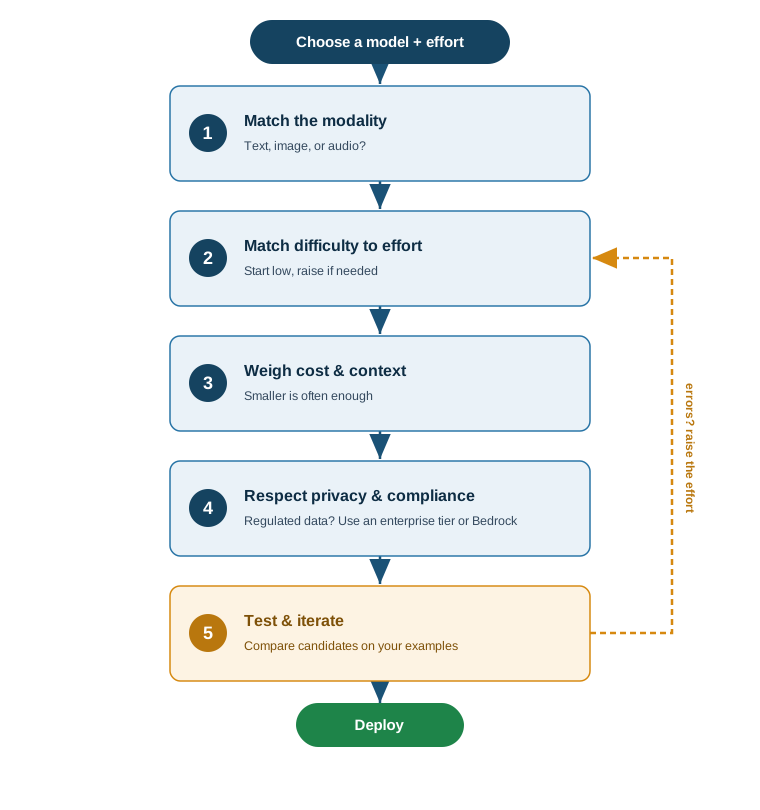
Fig. 1 Choosing the right model and effort level as a decision flow. Steps run top to bottom; the dashed loop returns to step 2 to raise the effort whenever the model makes reasoning errors.#
Tools and platforms#
These products fall into a few groups: AI assistants and app builders, AWS AI services, foundation-model families, and the programming and data tools you use around them.
AI assistants and app builders#
Perplexity is an AI-powered answer engine: it searches the web and returns a synthesized, cited answer rather than a list of links, useful for research with sources.
Microsoft Copilot is Microsoft’s family of AI assistants embedded across Windows and Microsoft 365 (Word, Excel, Outlook, and more), helping draft, summarize, and analyze inside the apps you already use. GitHub Copilot is the related coding assistant.
PartyRock is an Amazon Bedrock playground for building small generative-AI web apps with no code. You describe an app in plain language and it assembles the prompts and UI, a low-stakes way to learn prompt engineering.
AWS AI services#
Amazon Bedrock is a fully managed service that provides foundation models from multiple providers through one API, with security and customization built in. It is the backbone of this book; see Chapter 1: Introduction to Generative AI.
Amazon SageMaker AI / SageMaker Studio is AWS’s end-to-end platform for the full machine learning lifecycle, building, training, tuning, and deploying models. SageMaker Studio is its web-based IDE. Where Bedrock is about consuming foundation models through an API, SageMaker is about building and operating models yourself. The lab notebooks in this book are designed to run in SageMaker.
Amazon Nova is Amazon’s own family of foundation models available on Bedrock, spanning text and multimodal understanding and generation, positioned for strong price-performance.
AWS DeepRacer is a hands-on way to learn reinforcement learning (RL) through autonomous driving. It centers on a 1/18th-scale, fully autonomous race car that learns to drive a track by trial and error, plus a 3D racing simulator, and a global racing league for friendly competition. You define a reward function, train an RL model in simulation, and then evaluate it (in the simulator or on a physical car). It exists to make an abstract technique, RL, concrete and fun, which is why it is popular in classrooms and corporate upskilling. DeepRacer connects directly to this book’s themes: it is a small, safe example of the autonomous-agent and self-driving ideas in AI Literacy and Responsible Use, and the reward-and-reasoning loop echoes the agentic patterns in Chapter 4: Agents. See the AWS DeepRacer product page (https://aws.amazon.com/deepracer/) and the “DeepRacer on AWS” solution overview (https://docs.aws.amazon.com/solutions/latest/deepracer-on-aws/solution-overview.html) for current details.
Other foundation-model families#
Qwen is a family of open and commercial large language (and multimodal) models developed by Alibaba. DeepSeek is a family of models from the Chinese AI lab of the same name, noted for strong reasoning models released openly. Both are examples of the rapidly growing ecosystem of capable models beyond the best-known US providers.
Model hubs and local runtimes: Hugging Face, Kaggle, Ollama#
These three platforms are where the open-source AI community finds models, data, and the means to run them. They exist because not everyone wants to (or should) depend solely on closed, paid APIs, open tooling makes AI reproducible, inspectable, and runnable on your own terms.
Platform |
What it is, why it exists, and how it works |
|---|---|
Hugging Face |
The de facto hub for open models, datasets, and demos. It hosts hundreds of
thousands of pre-trained models (LLMs, vision, audio) and datasets, plus the
widely used |
Kaggle |
A data-science community and competition platform (owned by Google). It offers public datasets, free cloud notebooks (with GPU/TPU time), competitions with prizes, and learning courses. It exists to let people practice, learn, and benchmark data and ML skills on real problems with shared infrastructure. You work in a browser notebook against a dataset, often competing on a leaderboard. Use it to learn by doing, find datasets, get free compute for experiments, or benchmark an approach. |
Ollama |
A tool for running open LLMs locally on your own computer. It packages a
model and its settings so you can pull and chat with one via a single command
( |
How they fit together
A common open-source workflow: find a model on Hugging Face, prototype and train against a dataset using free Kaggle notebooks, then run the finished model privately on your laptop with Ollama. They are complementary, a hub, a practice/compute platform, and a local runtime, and contrast with managed services like Amazon Bedrock, which trade that hands-on control for convenience and scale.
Programming languages and data tools#
Tool |
What it is |
|---|---|
Python |
The dominant general-purpose programming language for AI and data science, with a vast ecosystem of libraries. Most AI code, including this book’s labs, is written in Python. |
R |
A language and environment specialized for statistics and data analysis, popular in academia and research. |
MATLAB |
A commercial numerical-computing environment used heavily in engineering and applied mathematics. |
Tableau |
A business-intelligence tool for interactive data visualization and dashboards, used to explore and present data rather than to build models. |
LangChain |
A framework for building applications on top of LLMs, chaining prompts, models, memory, tools, and data sources. It is the focus of Module 3. |
Jupyter Notebook |
A browser-based document that interleaves live code, output, text, and images. The labs in this book are Jupyter notebooks. |
RStudio |
The standard integrated development environment for the R language. |
Compiler vs. interpreter vs. IDE#
These three are often confused but play distinct roles:
A compiler translates an entire program’s source code into machine code ahead of time, producing an executable you then run (for example, C and C++ are compiled).
An interpreter executes source code directly, line by line, without a separate build step (Python and R are primarily interpreted, which is why you can run code cell by cell in a notebook).
An IDE (integrated development environment) is the application you write code in. It bundles an editor, tools to run or debug code, and often access to a compiler or interpreter. SageMaker Studio, RStudio, and VS Code are IDEs.
In short: the compiler/interpreter runs your code; the IDE is where you write and manage it.
Databases and embeddings#
AI applications need somewhere to store data, and generative AI introduced a new kind of store built around meaning.
RDBMS (relational database management system) organizes data into tables of rows and columns with defined relationships, queried with SQL. It excels at structured, transactional data.
MySQL is a widely used open-source relational database for web and enterprise applications.
SQLite is a lightweight, file-based relational database embedded directly in an application, with no separate server, common in mobile apps and small tools.
MongoDB is a NoSQL document database: instead of rigid tables it stores flexible, JSON-like documents, which suits unstructured or rapidly evolving data.
Embeddings are numerical vectors that capture the semantic meaning of text, images, or other data, the Titan Embeddings idea from Chapter 1: Introduction to Generative AI. Similar items have nearby vectors.
A vector database is built to store embeddings and find the most similar ones to a query vector quickly. This similarity search is what powers semantic search, recommendations, and retrieval-augmented generation (RAG), where an application retrieves relevant documents and feeds them to an LLM (covered in Module 3). Where a relational database answers “which rows exactly match these fields,” a vector database answers “which items mean roughly the same thing.”
Core architectural ideas#
Perceptron. The simplest building block of a neural network: a single artificial neuron that takes weighted inputs, sums them, and applies an activation function to produce an output. Stacking and connecting many perceptrons in layers produces the neural networks behind modern AI.
Deep learning. Machine learning using neural networks with many layers (“deep” networks). The depth lets the model learn increasingly abstract features of the data, and it is the approach underlying virtually all generative AI.
Transformer. The neural-network architecture introduced in the 2017 paper Attention Is All You Need, which made modern LLMs possible. Rather than reading text strictly in sequence, it uses attention to relate every token to every other token in parallel. The transformer is explained in detail in Chapter 2: Foundation Models and Large Language Models.
Attention Is All You Need. The landmark 2017 research paper by Vaswani and colleagues that proposed the transformer and the self-attention mechanism. It is one of the most influential papers in modern AI and is cited throughout this book.
Agents and assistants#
Agentic AI refers to AI systems that do not just answer a single prompt but pursue goals over multiple steps, deciding what to do, using tools (search, code execution, APIs), observing results, and adjusting, with limited human intervention. Agents are the subject of Module 3’s chapter on agents.
Personal AI assistants are agentic systems aimed at an individual’s tasks and context, able to manage to-do lists, send messages, and act across the user’s apps. Examples in this space include:
OpenClaw, an open-source personal AI agent (created by Peter Steinberger, first released in late 2025) that runs locally, connects to an external LLM such as Claude, GPT, or DeepSeek, and is operated through messaging apps. It uses a skills system in which each skill is a directory containing a
SKILL.mdfile with instructions, and it can run long-lived background “claw” agents that periodically check a task list and act. It attracted substantial attention in the open-source AI community.Claude Cowork, a desktop mode of the Claude app that lets a Claude agent work with files on your computer and automate multi-step tasks (the environment this book was assembled in). Cowork is a current Anthropic product; see the Claude Help Center (https://support.anthropic.com/) for availability and setup, which change over time.
ChatGPT Codex, OpenAI’s coding-focused agent that can read a codebase, write and edit code, run commands, and complete software-engineering tasks.
How agents relate to everything else
An agent is usually an LLM (the “brain”) wrapped in a loop that lets it plan, call tools, and react to results. The prompting techniques in Module 1, the LangChain framework and RAG in Module 3, and the databases above are the components agents are built from.
The futures of AI: ANI, AGI, ASI#
A common framing describes three stages of AI capability:
Stage |
Name |
Meaning |
|---|---|---|
1 |
ANI (Artificial Narrow Intelligence) |
AI that is good at one specific task, chess, translation, driving, image classification. This is the AI we use today, including today’s LLMs. |
2 |
AGI (Artificial General Intelligence) |
AI that can learn, understand, and perform any intellectual task at the same level as a human, matching human cognitive abilities across all fields. |
3 |
ASI (Artificial Superintelligence) |
AI that far surpasses all human intelligence, capability, and creativity combined. |
The progression runs ANI to AGI to ASI: AGI is the human-level milestone that would have to be reached before any move toward the beyond-human ASI. Today’s systems are most often classified as ANI: powerful but specialized, not generally intelligent, though the boundary between advanced general-purpose models and AGI is increasingly debated. When (or whether) AGI will be achieved is a matter of active and genuine debate among experts, with predictions ranging from a few years to many decades, and some doubting it will arrive on any predictable timeline at all. These remain open questions rather than settled facts.
Key takeaways#
A foundation model is broadly pre-trained and adapted to many tasks; effort levels and extended/adaptive thinking trade speed and cost for depth of reasoning.
Pick a model by modality, difficulty, cost, context length, and compliance, then test on your own examples.
Know the tool categories: assistants and app builders (Perplexity, Copilot, PartyRock), AWS services (Bedrock, SageMaker, Nova), model families (Qwen, DeepSeek), and the languages and IDEs you work in.
Relational databases store structured rows; vector databases store embeddings for similarity search and RAG.
Perceptron to deep learning to transformer is the architectural lineage of modern AI; agentic AI wraps models in goal-pursuing loops.
ANI to AGI to ASI describes narrow (today), human-level, and beyond-human AI; we are in the ANI era.
About this chapter
Written by Devharsh Trivedi, Ph.D., CISSP, Department of Computer Science, Bowie State University. ORCID: https://orcid.org/0000-0001-6374-7249. OpenClaw details were verified against the project’s documentation and reporting; other descriptions reflect standard, vendor-documented capabilities and should be confirmed against current product documentation.